How AI Is Used in Learning and Development Across Modern Workflows
How the AI Workflow Actually Works
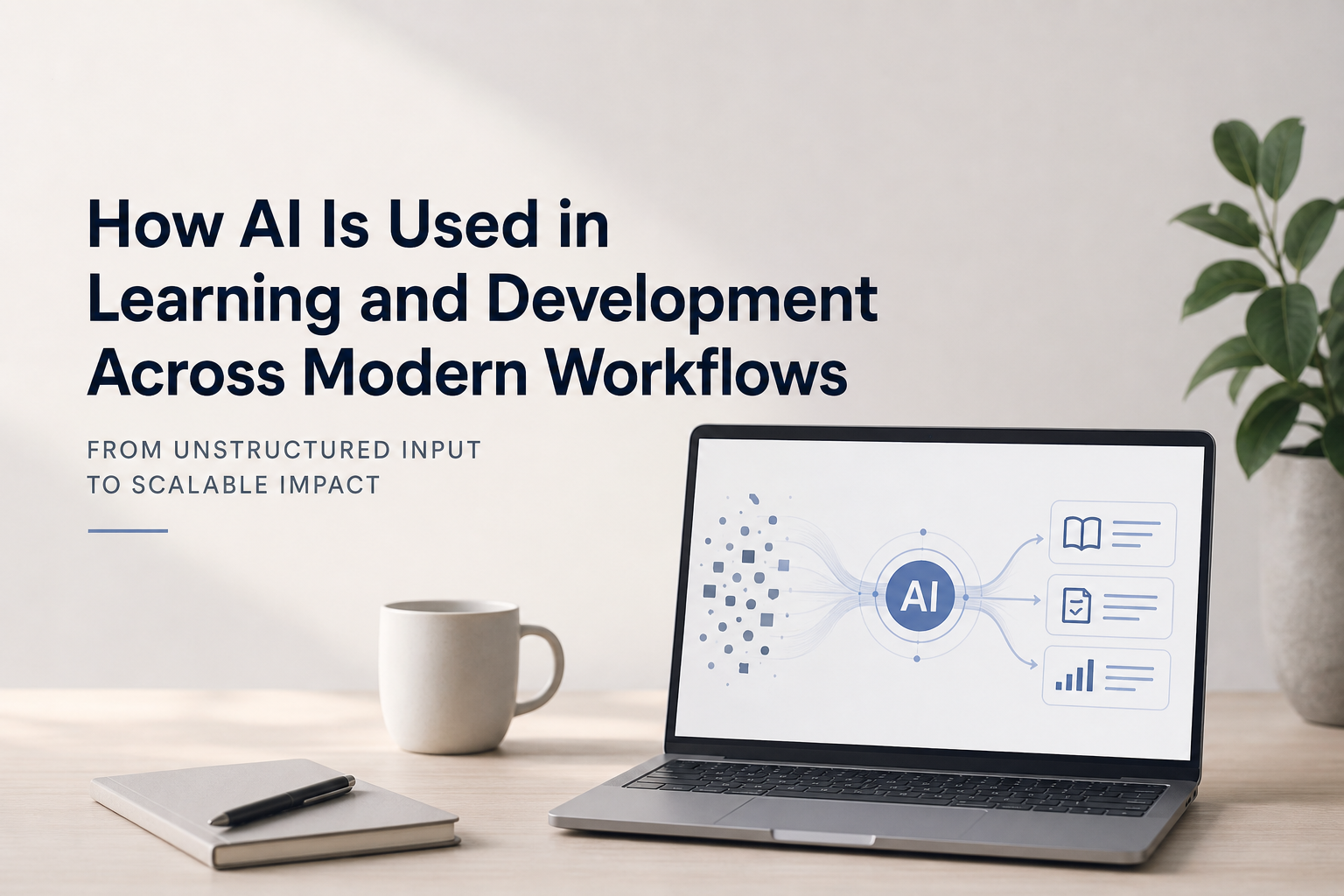
The goal of this workflow is to improve how work gets done by reducing the time spent organizing, rewriting, and interpreting information. In many SaaS environments, a large portion of work involves taking raw input—such as notes, data, requests, or ideas—and turning it into something structured and usable. This process is necessary, but it is often slow, inconsistent, and dependent on the individual doing it.
AI is applied to this part of the work. Instead of handling that transformation manually, AI is used to generate a structured starting point, which is then refined, repeated, and scaled. Over time, this changes how work is performed across a team, not just for a single task.
This pattern appears across many common SaaS workflows. For example, onboarding workflows involve turning product knowledge into structured training and documentation. Customer support workflows involve interpreting tickets and generating consistent responses or resolutions. Product and engineering workflows involve summarizing requirements, bugs, or feature requests into clear, actionable formats. Reporting workflows involve analyzing data and translating it into insights that can be shared with stakeholders. Internal communication workflows involve taking scattered information and turning it into clear updates, plans, or decisions.
In each of these cases, the work follows a similar pattern: unstructured input is transformed into structured output. This is the step where AI is most effective.
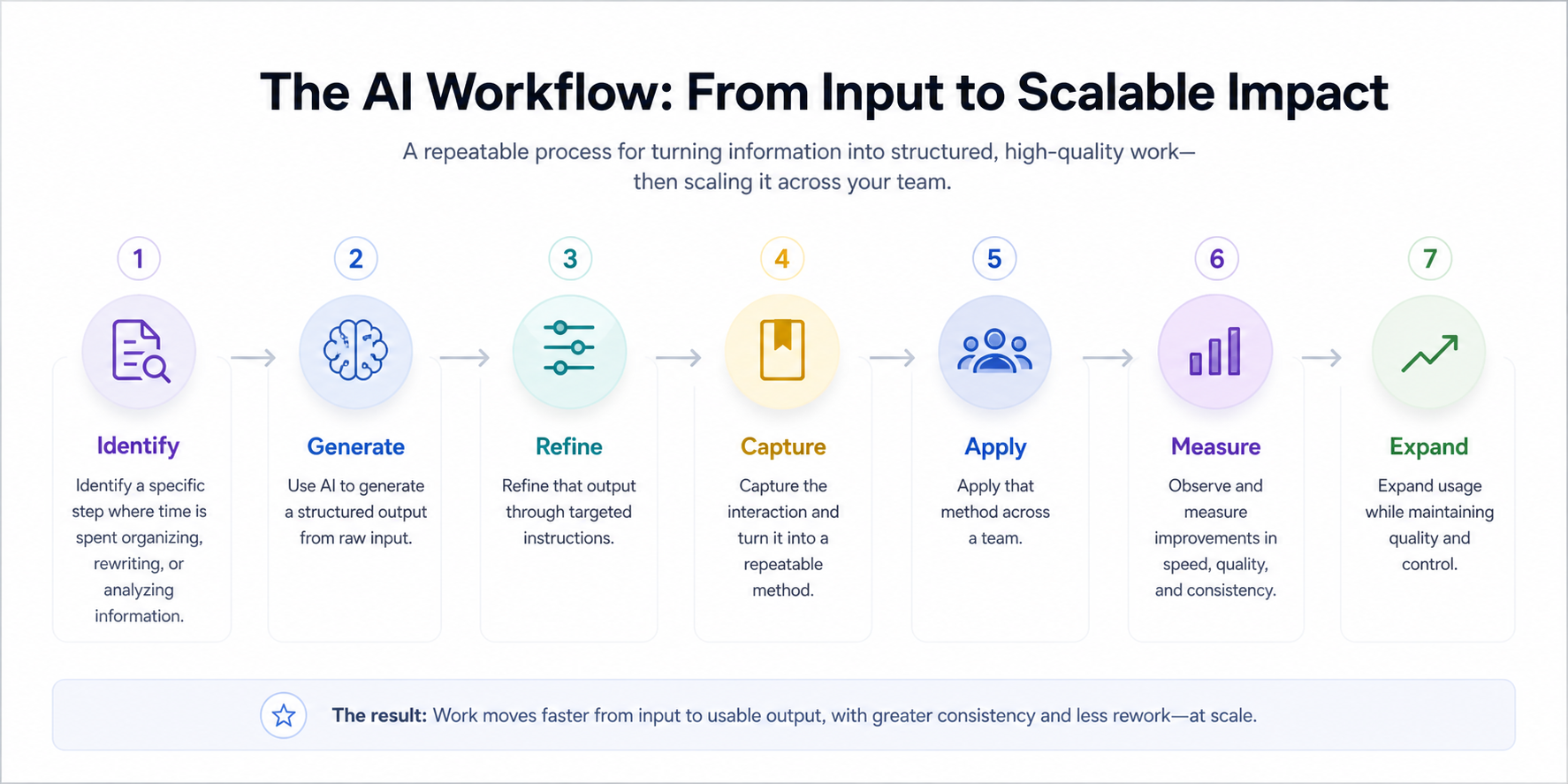
When used correctly, the workflow follows a consistent sequence:
Identify a specific step where time is spent organizing, rewriting, or analyzing information
Use AI to generate a structured output from raw input
Refine that output through targeted instructions
Capture the interaction and turn it into a repeatable method
Apply that method across a team
Observe and measure improvements in speed, quality, and consistency
Expand usage while maintaining quality and control
Once these steps are in place, the process becomes straightforward. You begin by isolating a task where you would normally spend time organizing or interpreting information. This might be turning SME notes into structured training, reviewing data to identify patterns, or drafting content from scattered ideas. Instead of doing that work manually, you provide the AI with the raw input and a clear instruction, and use its output as your starting point.
That output provides immediate structure. From there, you refine it by directing the AI to make specific adjustments—simplifying language, reorganizing the sequence, filling in missing details, or tailoring it to a specific audience. With each instruction, the output improves until it meets the required standard.
Once a reliable result is achieved, the interaction is captured. The instruction, along with an example of the input and output, is saved so the process can be repeated. This turns a one-time interaction into a method that can be used consistently.
As more people use the same method, the workflow begins to scale. Work becomes faster to start because no one is beginning from scratch, and outputs become more consistent because the same structure is being applied. The time previously spent figuring out how to approach the task is reduced.
As this continues, the impact becomes visible. Tasks move more quickly from input to usable output, and variation across different people’s work decreases. At that point, the same approach can be applied to additional parts of the workflow while continuing to review outputs and maintain quality.
Each section that follows focuses on one part of this process. Taken together, they show how AI is integrated into how work is performed from start to finish.
AI for Structured Generation (Content, Training, Documentation)
AI for structured generation is used when raw, unorganized input needs to be converted into clear, usable output. This process does not begin with writing or structuring content. It begins earlier, at the point where information is collected.
AI can be used to collect and organize SME knowledge more efficiently before any content is developed. Instead of relying only on traditional interviews and manual note-taking, AI supports the intake process by generating targeted interview questions, structuring intake forms, summarizing recorded conversations, and extracting key information from transcripts. A key tool in this stage is the use of AI meeting assistants, such as Otter.ai, Fireflies.ai, or Microsoft Copilot within Teams. These tools automatically record and transcribe SME sessions, identify key points, and allow you to search, highlight, and extract relevant information without relying on manual notes.
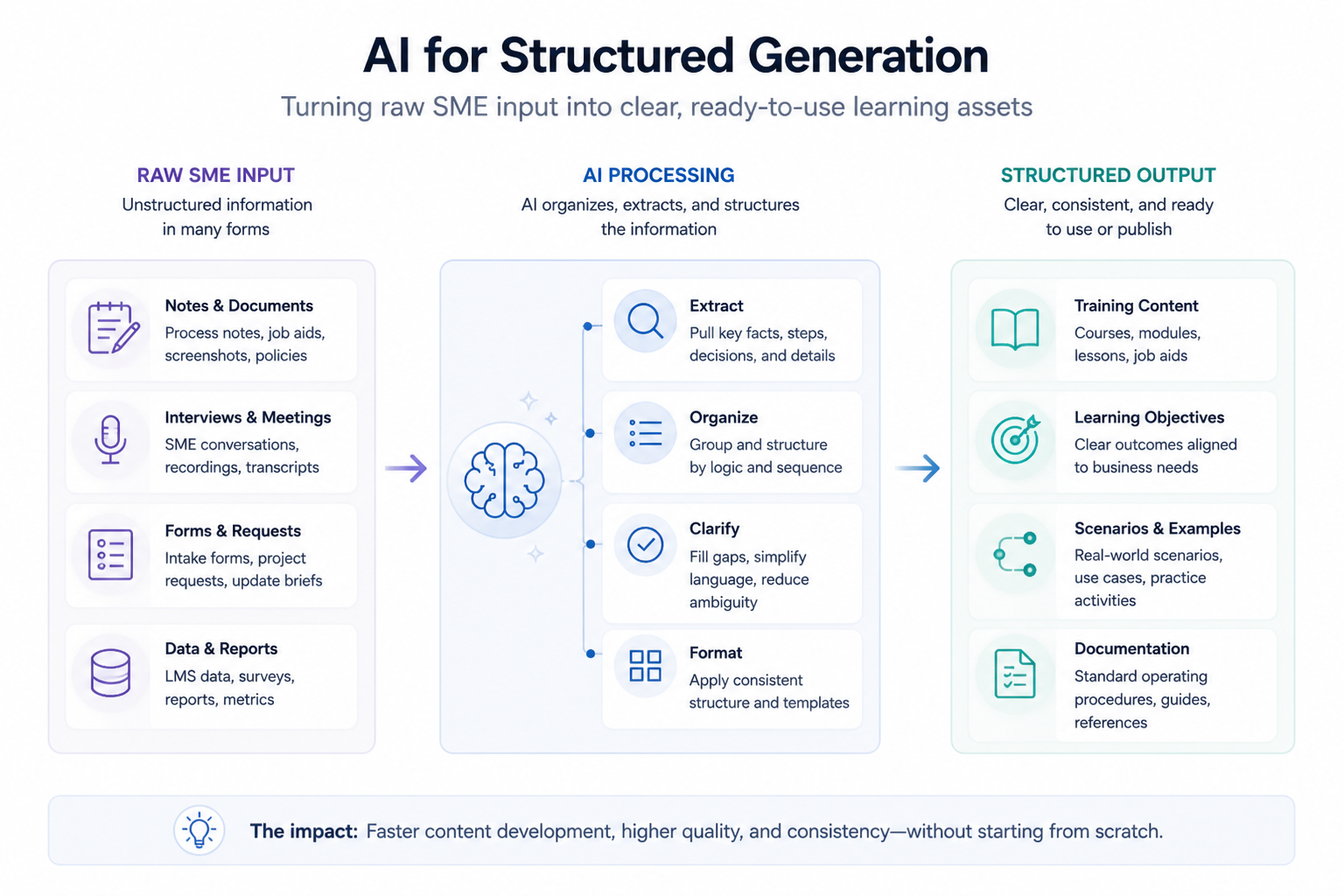
Once the conversation is captured, that transcript can be processed further using tools such as ChatGPT or Claude to identify steps, decision points, common errors, and gaps in the explanation. Instead of reviewing an entire recording manually, you can direct the AI to extract specific types of information, such as identifying all troubleshooting scenarios, listing key process steps, or highlighting where the SME assumed prior knowledge. This produces a more complete and organized starting point before any instructional design work begins.
AI can also be used before the SME conversation takes place. By providing existing documentation or system descriptions, you can instruct the AI to generate structured interview questions in advance. These questions can be grouped by process steps, edge cases, troubleshooting scenarios, and learner misconceptions. This ensures that SME sessions are focused, efficient, and aligned with the information needed for training development.
Once SME information has been collected, AI is used to convert that raw input into structured outputs. The input—whether it is notes, transcripts, or summarized content—is placed directly into a tool such as ChatGPT or Claude.
Every effective instruction includes three elements:
the role the AI should take
the intended audience
the required output
For example, the AI may be instructed to act as an instructional designer and produce learning objectives, a lesson outline, and a realistic scenario for a beginner-level learner. The AI generates a structured draft based on that instruction, which serves as a starting point rather than a final product.
The next step is evaluation. You review whether the sequence is logical, whether important steps are missing, and whether the level of detail matches the audience. Refinement is performed through additional instructions. Instead of manually rewriting content, you direct the AI to make specific adjustments, such as simplifying language, reorganizing steps, expanding missing details, or improving the realism of a scenario. Each instruction produces a revised output, and this process continues until the content meets the required standard.
This approach applies across multiple types of work. It can be used to:
generate training content
create knowledge check questions
develop scenarios
produce documentation or job aids
In each case, the workflow follows the same sequence:
collect information
extract and structure it
generate an initial output
refine that output through targeted instructions
By using AI at both the intake and generation stages, the entire front end of content development becomes more efficient and consistent. The instructional designer’s role shifts from manually capturing and organizing information to guiding, evaluating, and improving structured outputs.
AI for Analysis and Insight (Data, Performance, Reporting)
AI for analysis is used when the task involves interpreting information rather than creating it. This includes working with LMS data, survey results, performance metrics, or any dataset that requires explanation and decision-making.
The process can begin by providing data directly to an AI tool or by describing the dataset clearly. This is often done within tools such as ChatGPT or Claude, where the instruction defines the type of analysis required. For example, the AI may be asked to identify patterns in learner performance, highlight areas of low engagement, compare groups, or explain possible reasons for declining scores. The AI generates an initial interpretation, which can then be refined through follow-up instructions that narrow the focus or explore alternative explanations.
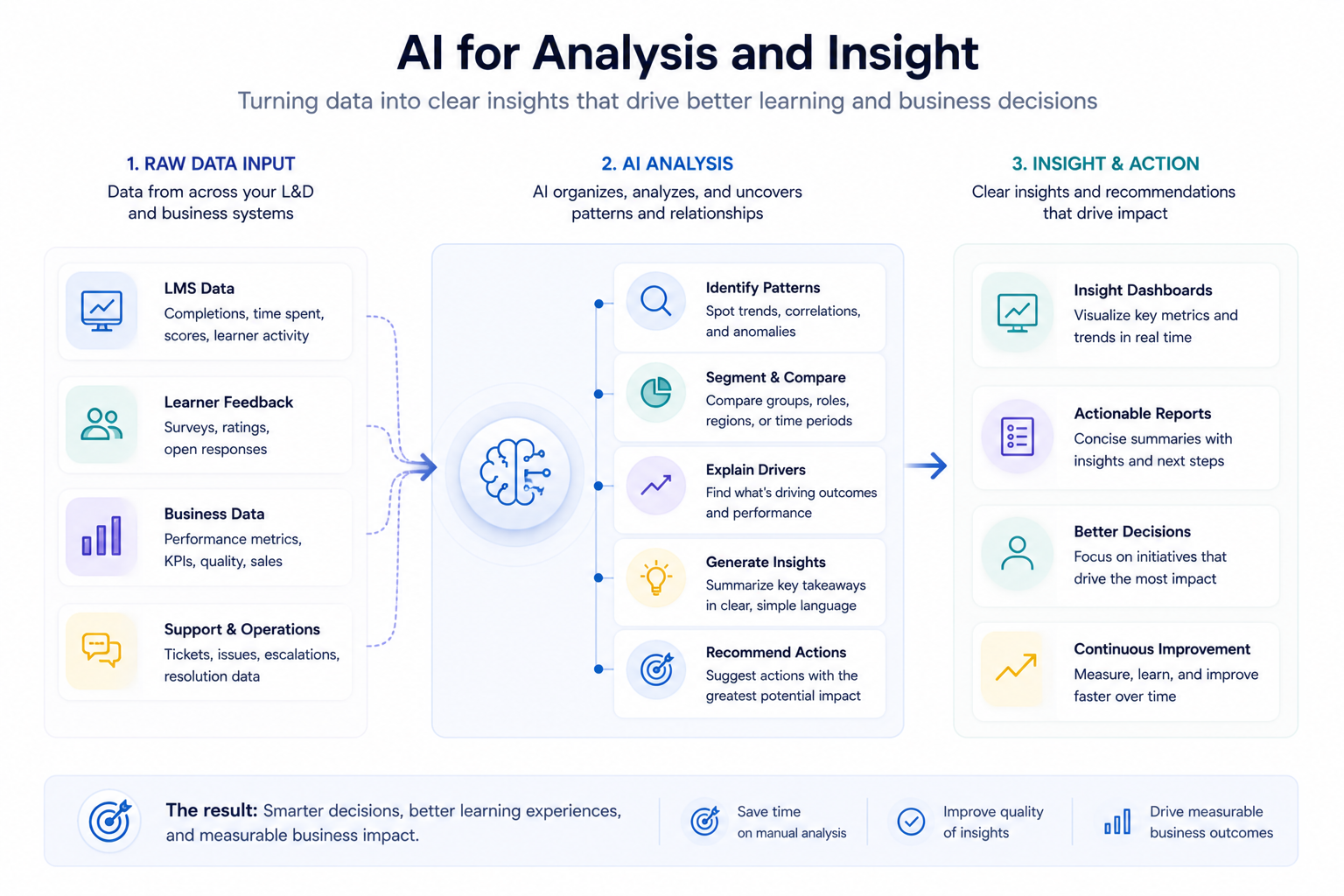
In many environments, this type of analysis is not performed in isolation. AI capabilities are often built directly into the systems where the data already exists. Business intelligence tools such as Microsoft Power BI and Tableau allow users to interact with data using natural language, automatically generate visualizations, and receive suggested insights based on patterns in the data. Learning platforms and reporting systems are also beginning to include similar features, enabling users to interpret data without exporting it into separate tools.
AI can also be integrated into workflows through connected systems, allowing analysis to occur continuously rather than as a one-time task. Data from an LMS, survey tool, or CRM can be routed through automation platforms such as Zapier, Make (formerly Integromat), or Microsoft Power Automate. These tools move data between systems and send it to AI models such as OpenAI API or Claude API for processing. The AI can then summarize responses, identify trends, classify information, or generate insights, and return the results to another system such as a dashboard, report, or notification workflow.
In this setup, AI is not only responding to questions—it is supporting how data is interpreted as part of the workflow itself. For example, survey responses can be automatically summarized as they are submitted, support tickets can be categorized and analyzed for recurring issues, and learning data can be continuously reviewed to identify performance gaps. This reduces the need for manual analysis and ensures that insights are generated consistently.
Regardless of where the analysis takes place, the interaction follows the same pattern. The AI produces an initial interpretation of the data, identifying trends, correlations, or areas of concern. That output is then evaluated for accuracy and relevance. Follow-up instructions or adjustments are used to refine the analysis and focus on the most important findings.
The role of the AI in this workflow is to accelerate pattern recognition and initial interpretation. The role of the user is to validate the findings, apply context, and determine the appropriate action. This division of work allows insights to be generated more quickly while maintaining control over decision-making.
This approach is particularly valuable when working with large datasets or when multiple interpretations need to be explored. It reduces the time required to move from raw data to actionable insight and allows analysis to be performed more consistently across teams.
AI for Communication and Decision Support
AI for communication is used when information needs to be translated into clear, structured messaging for different audiences. This includes drafting updates, summarizing complex topics, and preparing stakeholder communication.
The process begins by providing the AI with raw or partially structured input. This may be a rough draft, a set of notes, or a collection of ideas. The instruction defines the:
purpose of the communication
intended audience
desired tone
For example, the AI may be instructed to rewrite a technical explanation into a clear message for non-technical stakeholders.
The AI generates a structured draft that reflects the specified requirements. This draft is then reviewed and refined. Additional instructions are used to adjust tone, clarity, or level of detail. The goal is not to accept the output as-is, but to use it as a structured starting point.
This approach ensures that communication is clear, consistent, and aligned with the intended audience. It also reduces the effortrequired to move from unstructured ideas to a finalized message. The same process can be used for internal updates, training announcements, reports, or documentation.
In decision support scenarios, the AI can also be used to summarize options, compare approaches, or outline potential outcomes. The user remains responsible for the final decision, but the AI accelerates the process of organizing and evaluating information.
AI for Workflow Automation and Integration
AI for workflow automation extends beyond individual tasks and connects multiple steps within a process. Instead of using AI manually for a single piece of work, it is integrated into systems so that information is processed, interpreted, and routed automatically as part of an ongoing workflow.
At a practical level, this means that data is no longer handled step by step by a person. Instead, it moves between systems, with AI applied at specific points to transform that data into a usable format. The workflow is defined in advance, and once it is in place, it runs consistently without requiring manual intervention for each step.
For example, consider a training request workflow. A request is submitted through a form, which may include unstructured information about a training need. That submission is automatically sent through an automation platform such as Zapier, Make, or Microsoft Power Automate. The data is then passed to an AI model such as OpenAI API or Claude API, which structures the request into a defined format.
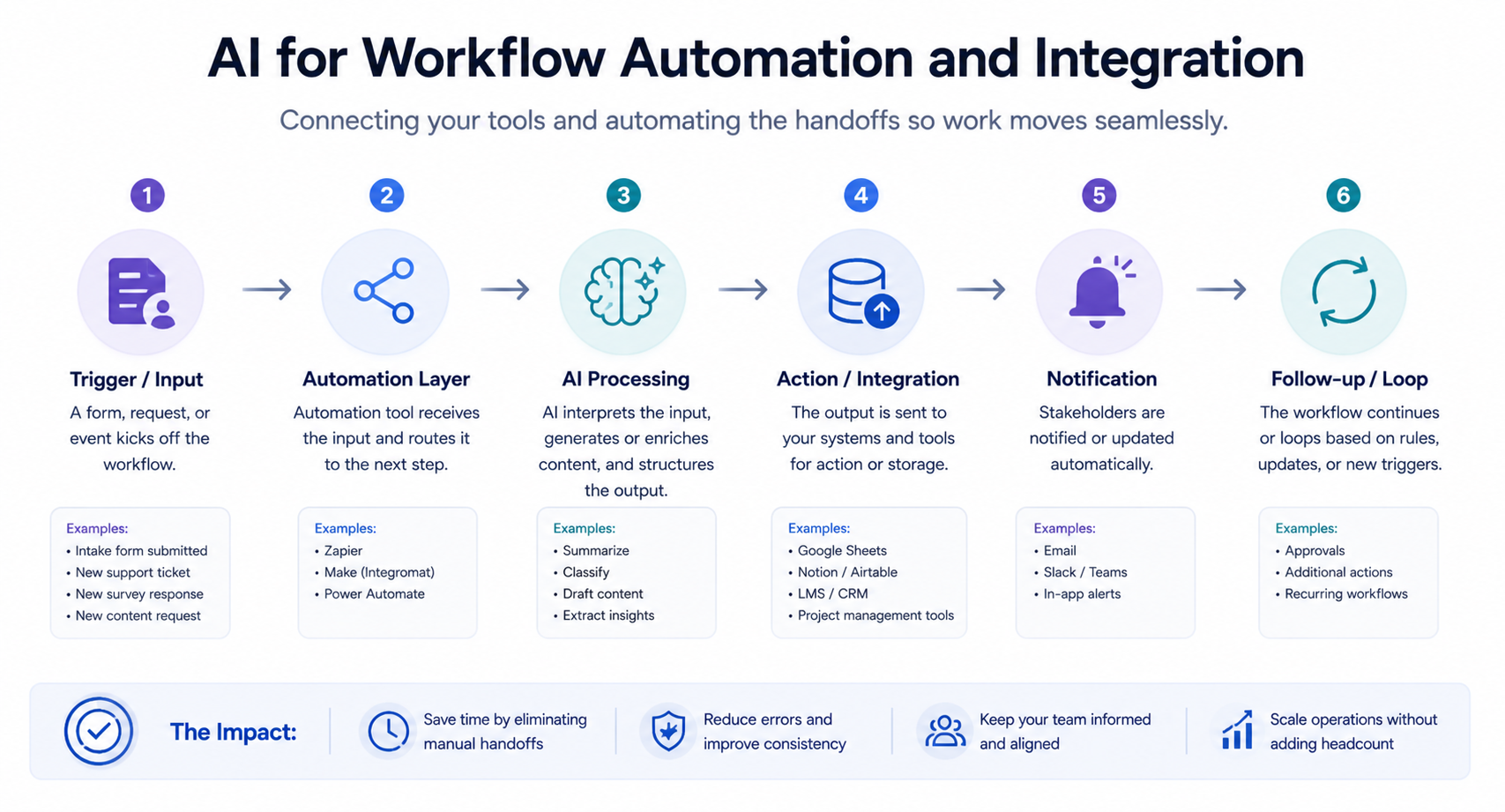
In this workflow, each component has a specific role:
automation tools move data between systems and trigger actions
AI interprets and structures the data so it can be used consistently
Once the AI has processed the input, the structured output is automatically sent to the next system. This could be a project management tool, a content development pipeline, or a shared workspace where the team can begin work. Notifications can also be triggered so that the appropriate stakeholders are informed immediately.
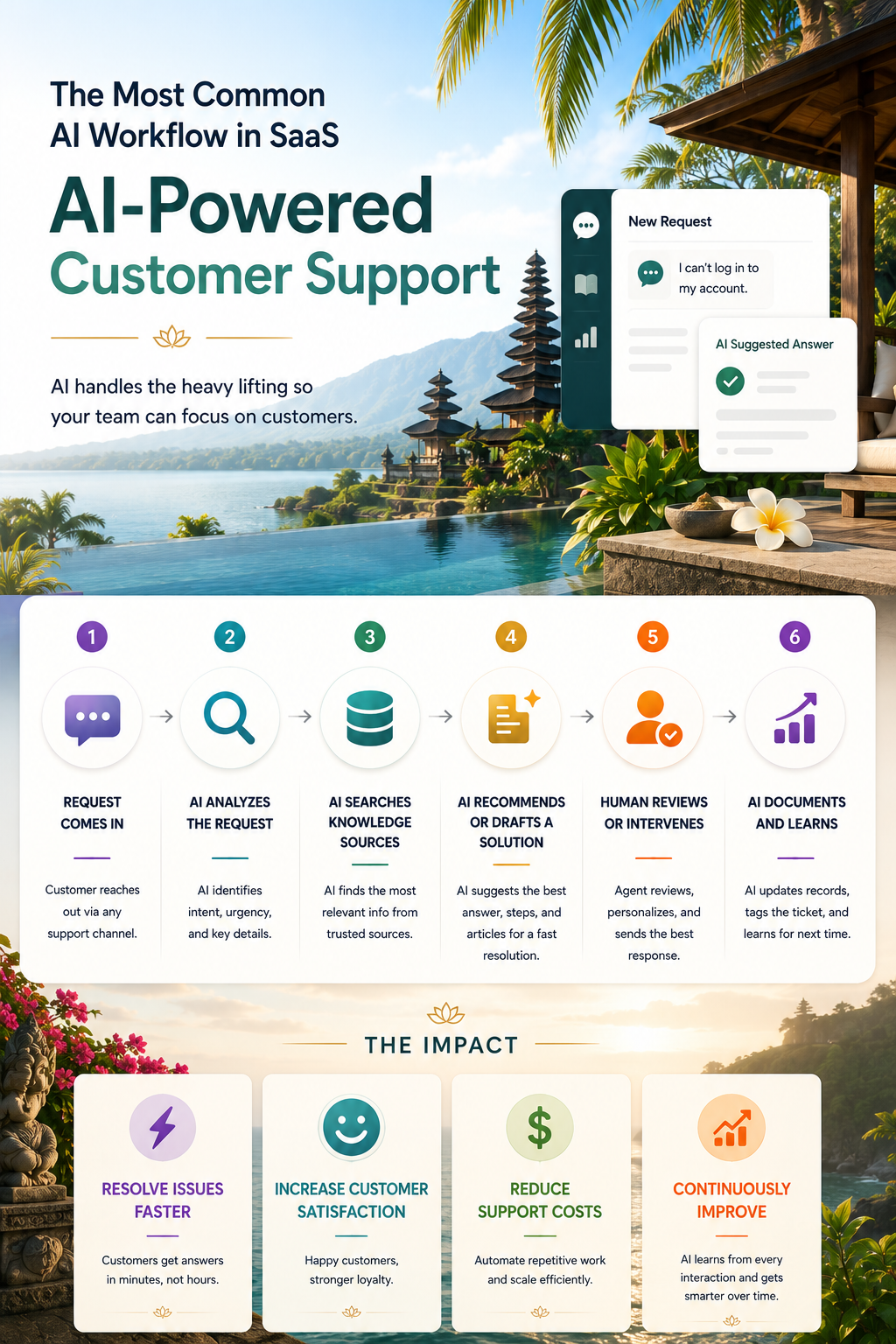
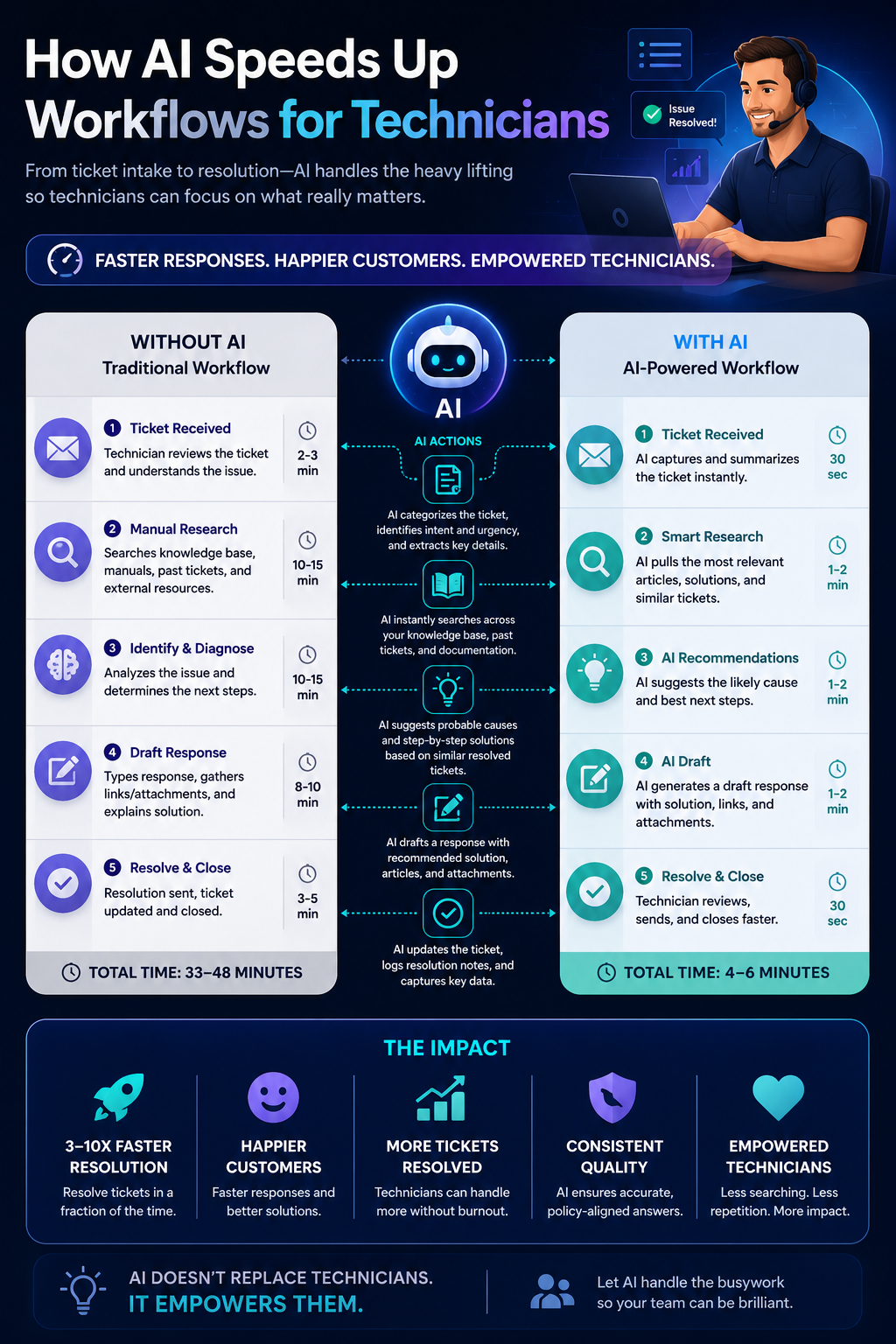
This same pattern can be applied across different types of workflows. In a reporting pipeline, data from an LMS or survey tool can be automatically collected, sent to an AI model for summarization and analysis, and then delivered as a report or dashboard update. In a support workflow, incoming tickets can be categorized, summarized, and flagged for priority using AI before being routed to the appropriate team. In communication workflows, updates can be drafted and structured automatically based on incoming information, then reviewed before being distributed.
The key requirement for this approach is that the workflow can be broken into clearly defined steps. Each step must have a specific function, such as collecting input, transforming information, or routing output. AI is applied at the points where information needs to be interpreted or structured, while automation tools manage the flow between those steps. When these roles are clearly defined, the workflow becomes reliable and repeatable.
As these workflows are implemented, the impact becomes noticeable. Manual handoffs are reduced, information is processed more consistently, and tasks move more quickly from input to action. Instead of relying on individuals to interpret and route information each time, the system performs those steps automatically, allowing teams to focus on higher-level work such as decision-making and quality control.
Over time, these workflows can be expanded and refined. Additional steps can be added, AI instructions can be improved, and new integrations can be introduced as needed. The result is a system where AI is not just assisting with individual tasks, but actively shaping how work flows across tools, teams, and processes.
Making AI Work Repeatable (Operationalization and Adoption)
The value of AI is not realized through individual use. It is realized when the same methods can be applied consistently across a team. This requires capturing the interactions that produce effective results and turning them into repeatable processes. This involves:
documenting the instructions used
providing example inputs and outputs
defining how the output should be evaluated
These elements are stored in a shared location so they can be accessed and reused by others. The goal is to eliminate the need for each individual to experiment independently.
Adoption is achieved by integrating these methods into real work. Team members are guided through using AI on their own tasks, and support is provided as they refine their approach. Over time, consistent use leads to improved confidence and performance.
The combination of documented methods and practical application ensures that AI becomes part of the workflow rather than an optional tool.
Measuring the Impact of AI on Workflows
Measuring impact is about showing that the way work is performed has improved in a measurable way. The comparison is not between “with AI” and “without AI” in theory—it is between how a task was completed before and how it is completed now.
The most immediate changes appear in how work moves from input to output. Tasks that previously required time to organize, structure, and begin can now start with a usable draft. This reduces the time spent deciding how to approach the work and shifts effort toward refining and improving the result. At the same time, outputs become more consistent because the same structure and methods are being applied across different people and projects.
These changes can be observed directly, but they become more meaningful when they are tracked in specific ways. The impact typically shows up in a few key areas:
time to first draft, where work begins with a structured output instead of a blank starting point
consistency of output, where similar tasks produce similar structure and quality across the team
revision effort, where less time is spent restructuring and more time is spent refining
speed of insight, where data is interpreted and turned into conclusions more quickly
For example, in content development, the time required to produce an initial outline or draft is reduced, allowing more time to be spent improving instructional quality. In assessment creation, question sets follow a more consistent structure, reducing the need for rework. In data analysis, patterns and insights can be identified more quickly, allowing decisions to be made sooner.
These improvements can be tracked using tools such as Excel, reporting dashboards, or business intelligence platforms like Microsoft Power BI and Tableau. Even simple tracking—such as comparing task timelines, reviewing output consistency, or collecting team feedback—can provide a clear picture of how the workflow has changed.
The most important outcome is not the metric itself, but the ability to clearly describe the difference. Work starts faster, outputs are more consistent, and less effort is spent structuring information. When these changes can be demonstrated, the impact of AI becomes visible and defensible.
How These Tools Fit Together in L&D AI Workflows
The tools used in AI-enabled workflows are not valuable on their own. Their value comes from how they are connected to support the movement of information from input to output across a Learning and Development process.
At a high level, these workflows are supported by three distinct layers. Each layer plays a specific role in how work is performed.
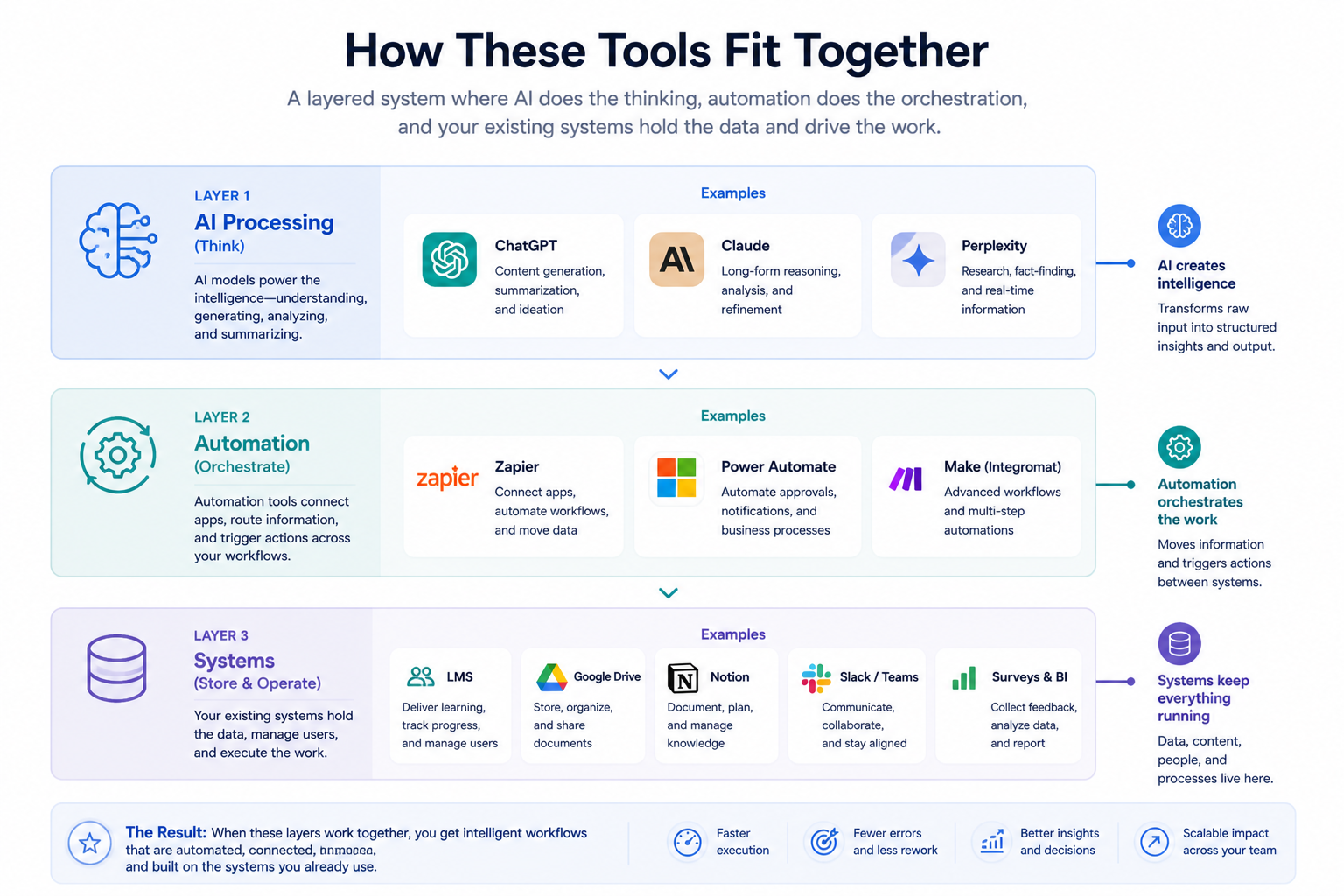
The first layer is the input and system layer. This includes the systems where information originates, such as LMS platforms, survey tools, support systems, and documentation repositories. These systems contain the raw input that needs to be interpreted, structured, or analyzed.
The second layer is the AI processing layer. This is where tools such as ChatGPT, Claude, or Microsoft Copilot are used to transform that input into a usable format. In this layer, AI is responsible for structuring information, identifying patterns, generating content, and producing initial outputs that can be refined.
The third layer is the automation and workflow layer. This includes tools such as Zapier, Make, or Microsoft Power Automate, which move information between systems and trigger actions. These tools ensure that data flows from one step to another without requiring manual intervention, allowing workflows to operate consistently.
When these layers are connected, the workflow becomes continuous. For example, SME input can be captured through a meeting assistant, processed into structured content using AI, and then routed into a content development pipeline. Survey data can be collected, analyzed automatically, and delivered as a summarized report. Training requests can be submitted, structured, and assigned without requiring manual triage.
In this model, AI is not a standalone tool that is used occasionally. It is part of a system that supports how information moves through the organization. The effectiveness of the workflow depends on how clearly each layer is defined and how well those layers are connected.
Understanding how these tools fit together is more important than mastering any individual tool. As platforms evolve, the specific tools may change, but the structure of the workflow remains consistent.
Examples of AI in Workflows
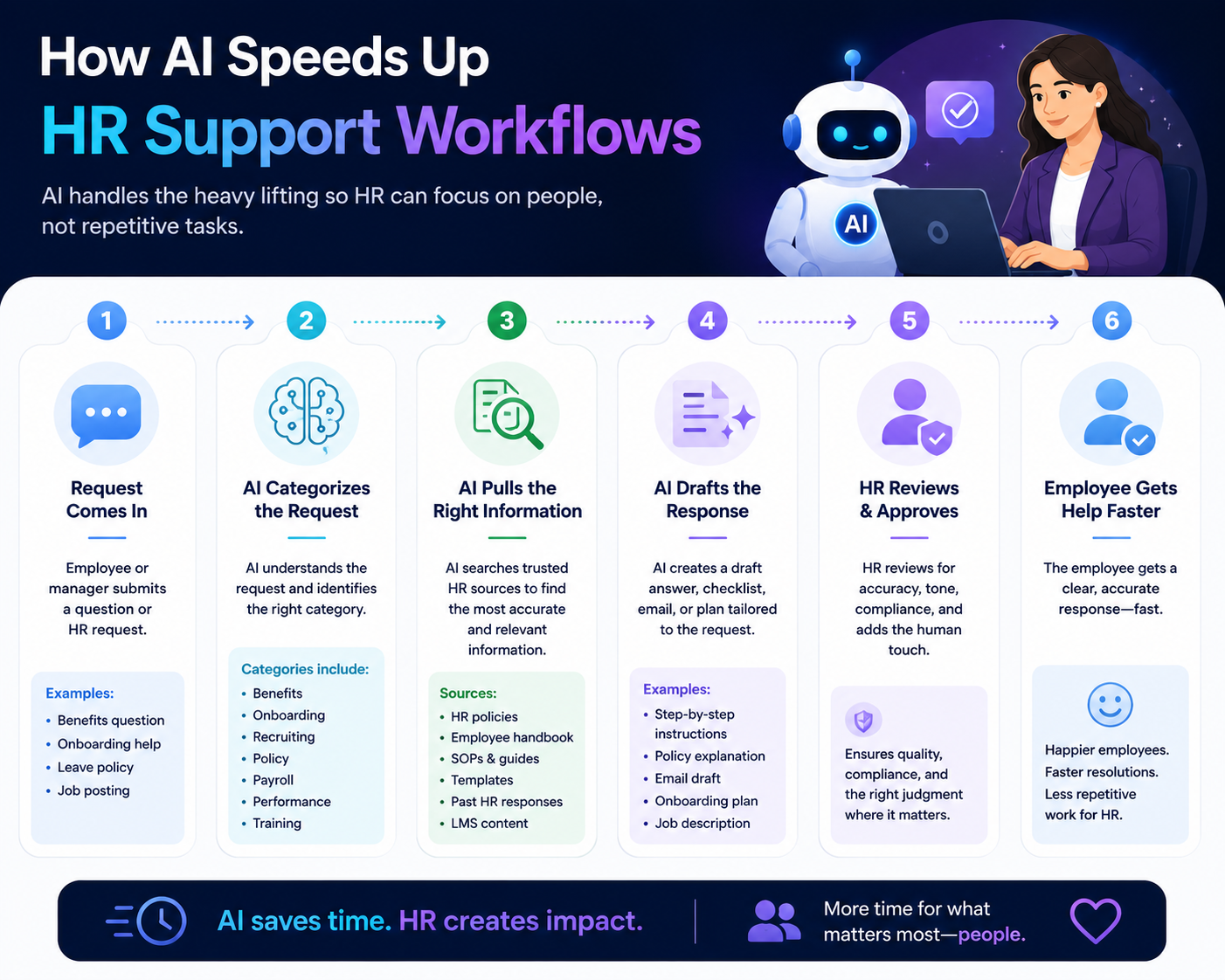
Lets look at some common examples of AI in modern workflows to get a solid idea of how this works in practice.
Customer Support Teams
Technical Support Teams
HR Teams Supporting Employees
Advanced Expectations and Professional Judgment
Once these workflows are established, the role extends beyond execution. It includes applying judgment, ensuring output quality, and supporting responsible use.
This involves determining when AI should be used, reviewing outputs for accuracy, and guiding usage across teams. It also includes connecting AI usage to business outcomes by demonstrating improvements in efficiency, quality, and productivity.
Conclusion
AI in modern workflows is not a single skill or tool. It is a set of practices that improve how work is performed across multiple areas. By applying AI to structured generation, analysis, communication, and workflow automation, and by making these methods repeatable and measurable, organizations can improve efficiency, consistency, and overall performance.
Explore More Articles